
Event Handlers
Event handlers run a script when a server event fires. Each handler binds an event to a script, with a priority, a timeout, an enabled flag, and an option to run asynchronously. Disabled handlers are kept but never run.
Event handlers are a license gated feature. If your license does not include scripting, the page shows a locked notice in place of the list and the Save action is hidden.
Create a script first
Event handlers need a script to run. You must create at least one script on the Scripts page before you can add a handler. Until a script exists, the page shows the message Create a script first; event handlers need one to run, and the Add handler button is disabled.
Add a handler
Click Add handler to append a new handler to the list. When no handlers are configured, the page shows No event handlers configured.
Each handler exposes the following fields:
- Event: the server event that triggers the handler. The list is filterable.
- Script: the script to run when the event fires. The list is filterable; the placeholder reads Select a script.
- Priority: the order in which handlers run, within the context of its associated event handler, starting at 0. Multiple scripts can have the same priority, if they are associated to different event-handlers.
- Timeout (s): the maximum time in seconds the script is allowed to run. See What happens when you leave the timeout at zero.
- Enabled: when checked, the handler is active. When unchecked, the handler is kept but never runs.
- Run asynchronously: when checked, the script runs without blocking the event. See Asynchronous handlers under load.
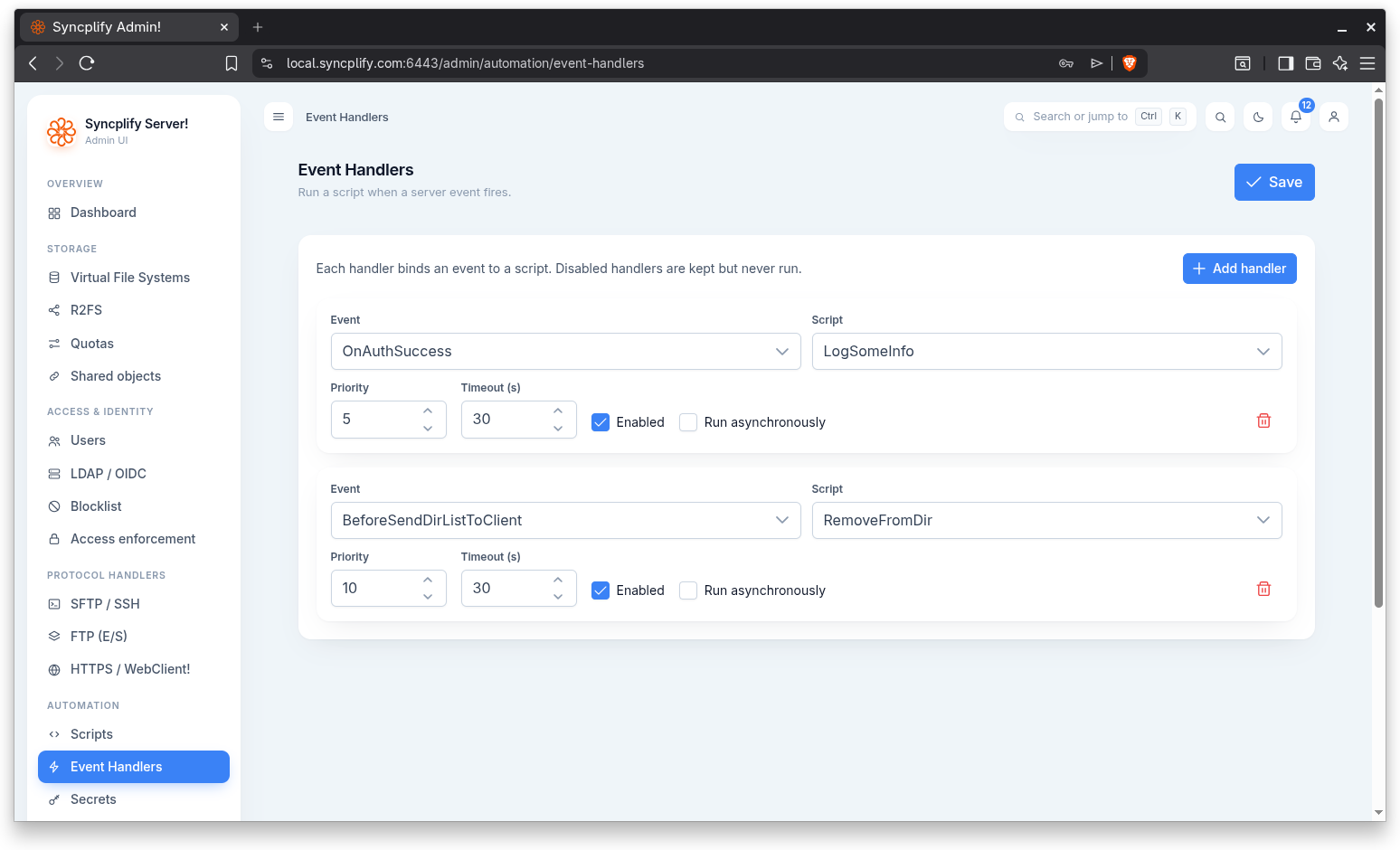
After you change handlers, click Save to persist the whole set.
What happens when you leave the timeout at zero
A timeout of zero means "use the default", and the default depends on when the event fires:
- One hour for ordinary events, which is to say every event that happens after a user has authenticated.
- 30 seconds for events that can fire before any user has authenticated:
OnNewConnection,BeforeSendSoftwareID,OnShieldStrike,OnShieldBan,OnShieldBanHit, and the wholeOnAuth...family up to and includingOnAuthFail. These are the events a complete stranger can make fire, as often as they like, simply by opening connections, so a handler on one of them that runs long is a way for that stranger to tie up the server.
A timeout you set yourself is always used exactly as you set it, whether it is longer or shorter than either default. If you have a pre authentication handler that genuinely needs more than 30 seconds, set the value you need and it will be honoured.
WARNING
In versions before v8.0.7 a timeout of zero meant roughly 115 days, which in practice meant no timeout at all: a handler that hung was never reclaimed. If you have a handler that relies on running for longer than the defaults above, set an explicit timeout on it before upgrading.
Execution limits
Above the list of handlers there is a single setting, Max concurrent asynchronous scripts, which controls how many handlers marked Run asynchronously may be executing at the same time across one worker.
A handler marked Run asynchronously is started and left to finish on its own, so the event that triggered it does not wait. Without a limit, a burst of events would start an unlimited number of scripts at once, and since several of the events that can dispatch a handler fire before anybody has authenticated, that burst is something a complete stranger can produce simply by opening connections. Each running script carries its own JavaScript engine, so this is a bound on memory as much as on concurrency.
The default is 64. You can set anything from 1 to 4096; a value outside that range, or a configuration saved before this setting existed, is treated as the default. Changing it takes effect on the next event, with no restart.
If every slot is busy when an event fires, that particular asynchronous run is skipped and a warning is written to the log naming the script and the event. Synchronous handlers are never skipped. If you see those warnings, either your scripts are running longer than you expect, or the event is firing far more often than you expect, and both are worth looking into before simply raising the number.
TIP
Raising this value does not make scripts finish sooner, it only allows more of them to be in flight at once. If the warnings are caused by a slow handler, the handler is the thing to fix.
Remove a handler
Use the trash icon on a handler to remove it from the list. Remember to Save so the removal is persisted.
Disabled handlers
Clearing the Enabled checkbox keeps the handler in the list but stops it from running. This is useful for temporarily turning off automation without losing the configuration.
Per user event handlers
The handlers on this page are server wide. Individual users can also have their own event handlers, defined on the Event handlers tab of the user editor. See the Users page for details on per user automation.